
Structured work orders
for O&M teams
Create, assign, and track work orders from inspection findings, platform alerts, and tasks added by your operations team
A defect list does not close the loop
Detecting a problem is only the start. Without a unified system, tasks from inspections, alerts, and field reports quickly scatter across tools, making it impossible to prioritize, assign, and track work effectively
Manual work planning
Analysis results and field reports still need to be turned into tasks manually, slowing down response.
No consistent prioritization
Without clear rules for assessing impact, it is hard to decide which tasks require immediate action.
Limited visibility into field work
Managers can’t clearly see what’s in progress, stuck, or already completed.
Disconnect between field and system
Repair documentation and field feedback often don’t make it back to a single source of truth.
How a problem becomes
a structured work order
One platform that connects the source of the problem,
the O&M team's work, and data updates in the system
Problem detected or reported
The issue may come from an inspection, platform data analysis, or a report added by the team.
Work order creation
The platform structures tasks, sets priorities, and creates work orders based on rules or operational decisions.
O&M execution
Technicians receive the technical context, status information, and details they need to complete the work.
System and component history update
Statuses, notes, and documentation flow back into the platform, updating the Digital Twin and component history.
A single environment for managing service orders
From priorities and work statuses to defect details and real-time platform data synchronization.
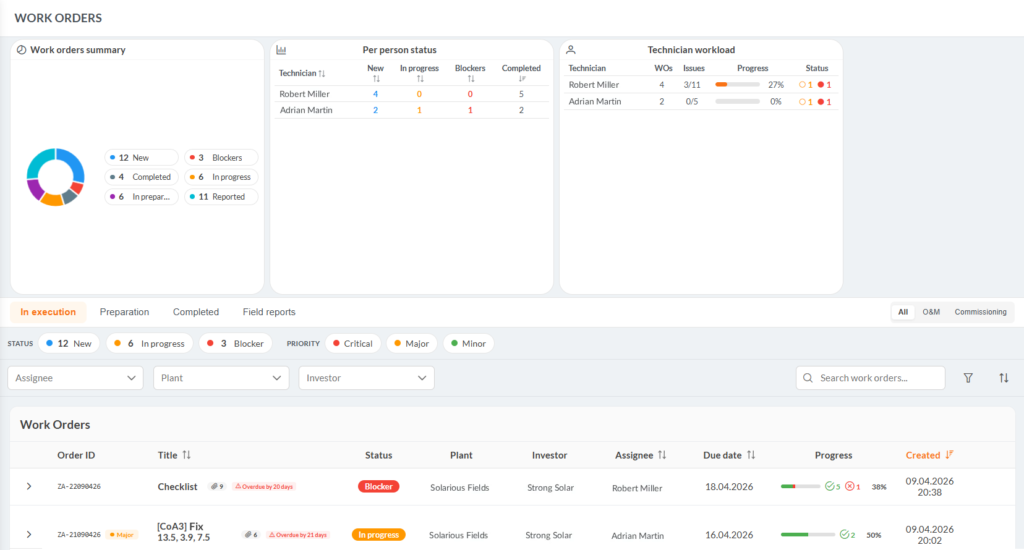
Work order and priority overview
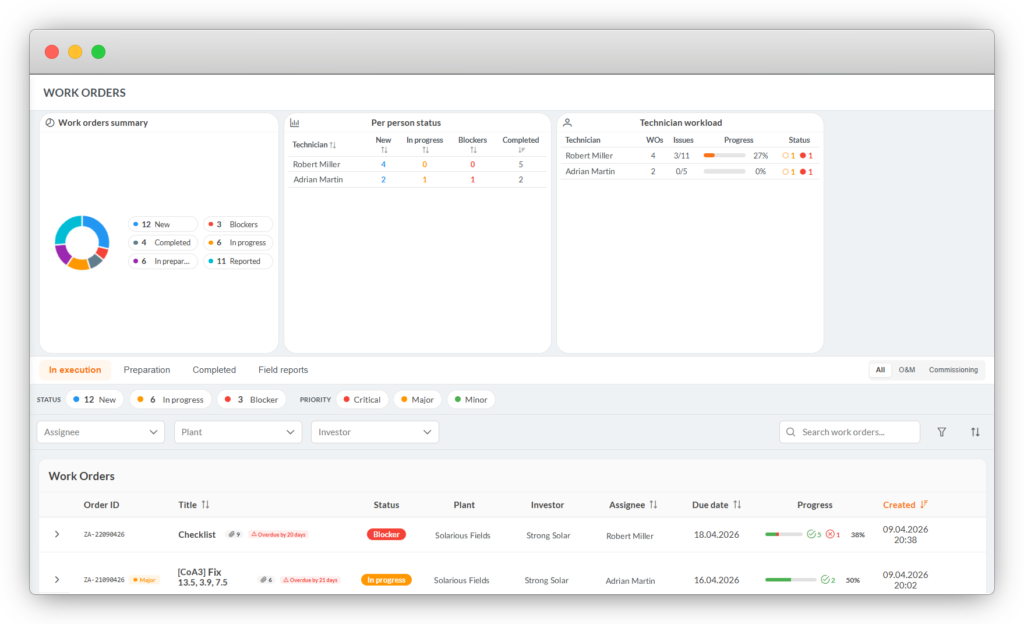
Managers see statuses, deadlines, assignments, and progress in one place. Work orders can come from inspections, platform data, or tasks added by the operations team.
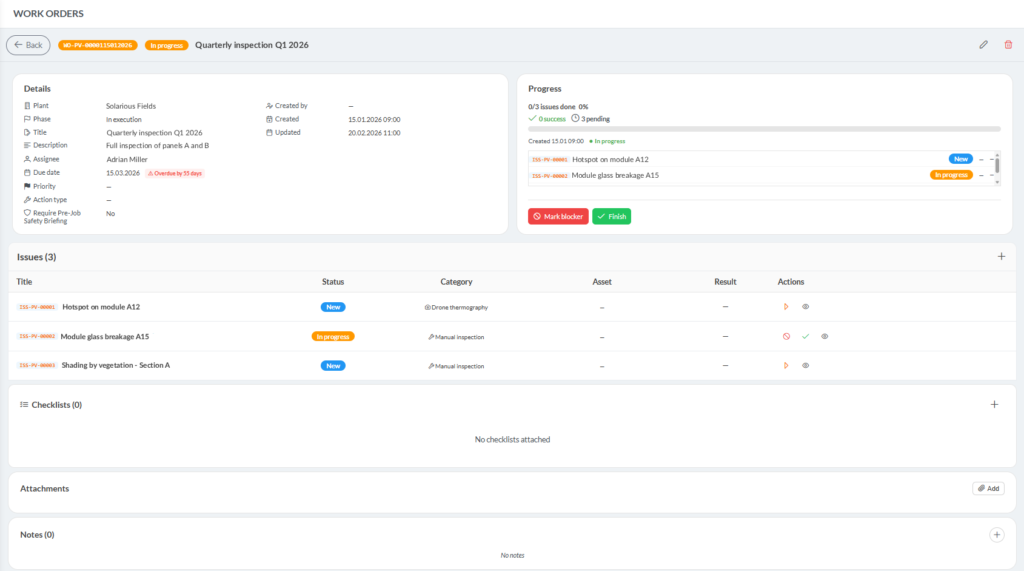
Full context of each work order
Each work order includes the problem description, defect list, deadline, assignee, and execution stage. Status updates, notes, and field documentation flow back into the platform, updating component history and the Digital Twin.
Field app for O&M teams
Technicians work on assigned work orders with
full technical context and real-time data synchronization.

The mobile app gives them access to assigned tasks, problem locations, component history, and the ability to add photos and field documentation. It also works offline, synchronizing data once the connection is restored.
- Assigned work order list
- Problem locations on the PV plant map
- Component history and defect details
- Repair documentation and field photos
- Offline work with automatic synchronization once the connection is restored
What O&M teams and operations managers get?
Less manual planning, faster work delegation, and better control across the portfolio.
Less manual work order planning
Instead of organizing tasks across several tools, the team works from one structure for actions and statuses.
More context for technicians
Every task includes the problem location, component history, and the context needed to complete the work.
Better progress visibility
Managers can see status and execution progress across the entire portfolio.
Consistent data after work completion
Notes and documentation do not get lost outside the system – they flow back into the platform.
Faster work assignment
Work orders can be assigned, updated, and tracked in one system.
Component history updates
Every field update improves the quality of asset data.
Frequently Asked Questions
What are Solar Spy's organized work orders?
It’s a system for creating, assigning, and tracking work orders based on inspection results, platform monitoring signals, and tasks added manually by the operational team – all in one place, instead of scattered tools and lists.
Why isn't a defect list alone enough to manage service work?
Because a defect list only shows problems – it doesn’t tell you which ones need an immediate response, who’s responsible for them, or what stage the repair is at. Solar Spy combines data from inspections, monitoring, and O&M reports, prioritizes defects, and tracks work orders in one place, eliminating the chaos of working across multiple tools.
What problems does the work order module solve?
Four main ones: manual work list creation (analysis results have to be turned into tasks by hand, which slows the response), lack of consistent priorities (without clear rules it’s hard to tell what needs immediate action), poor field work visibility (the manager can’t clearly see what’s in progress, stuck, or already done), and a disconnect between the field and the system (repair documentation often doesn’t make it back to a single data source).
How does a problem turn into a work order?
The process has four steps: detection or reporting of the problem (from an inspection, platform data analysis, or a report added by the team), work order creation (the platform sets priorities and builds the order based on rules or operational decisions), execution by the O&M team (the technician gets the technical context, statuses, and details), and system and component history update (statuses, notes, and documentation flow back into the platform).
What does the manager see in the work orders and priorities overview?
Statuses, deadlines, assignments, and progress for all work orders in one place – regardless of whether the order came from an inspection, platform data, or a task added manually by the operational team.
What does the detailed work order view include?
A description of the problem, a list of related defects, a deadline, technician assignment, and the execution stage. Statuses, notes, and field documentation flow back into the platform, automatically updating the component history and the Digital Twin.
How does the field app work for the O&M team?
The mobile app gives the technician a list of assigned work orders, the location of problems on the farm map, component history and defect details, and the ability to add photos and documentation from the field. It also works offline, with data syncing automatically once the connection is restored.
Does field data flow back into the system automatically?
Yes. Every change a technician makes in the field – a status update, a note, a photo, or documentation – flows back into the platform and strengthens the quality of the installation data, updating the component history and the Digital Twin.
What real benefits does implementing work orders bring to the O&M team?
Less manual planning (one structure for tasks and statuses instead of several tools), faster work delegation (assigning, updating, and tracking within a single system), better progress control across the whole portfolio, consistent data after work is completed (notes and documentation always flow back into the platform), and more context for technicians on every task.